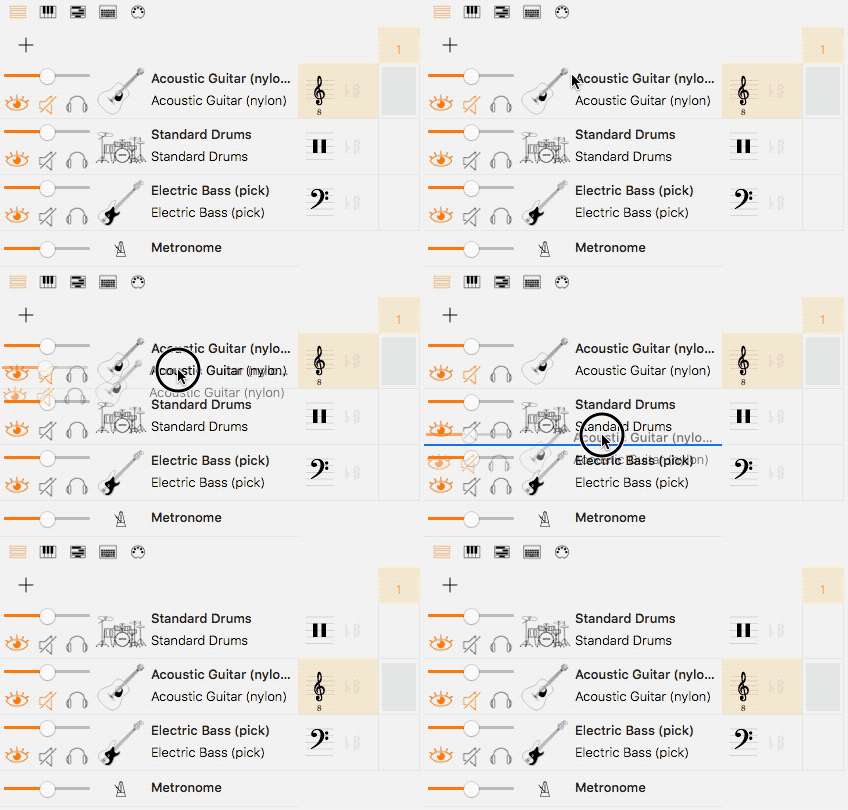
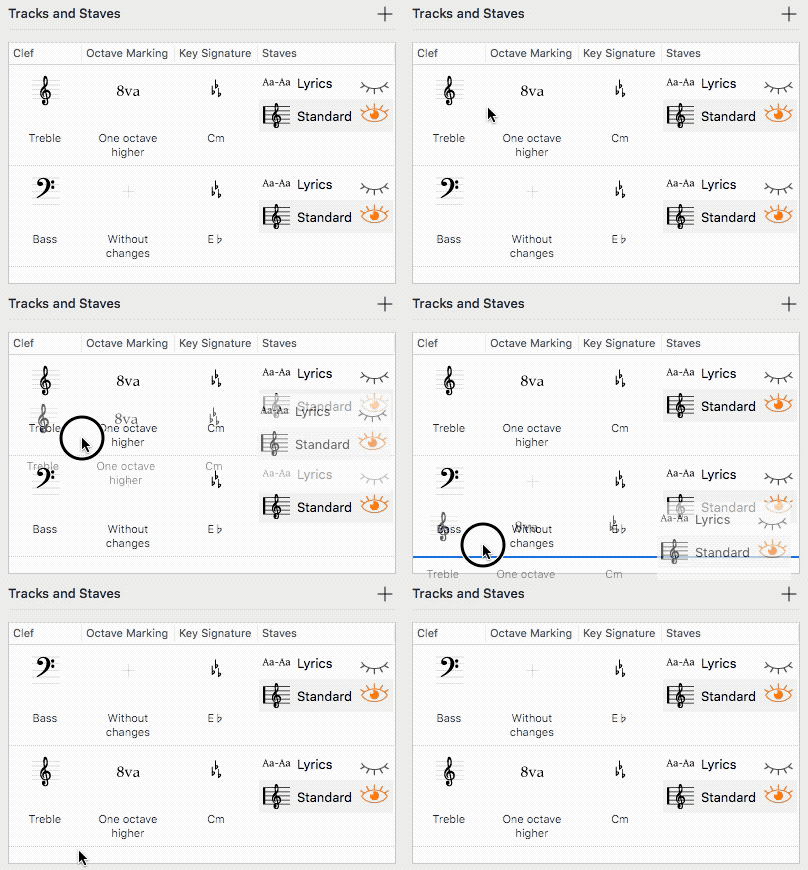
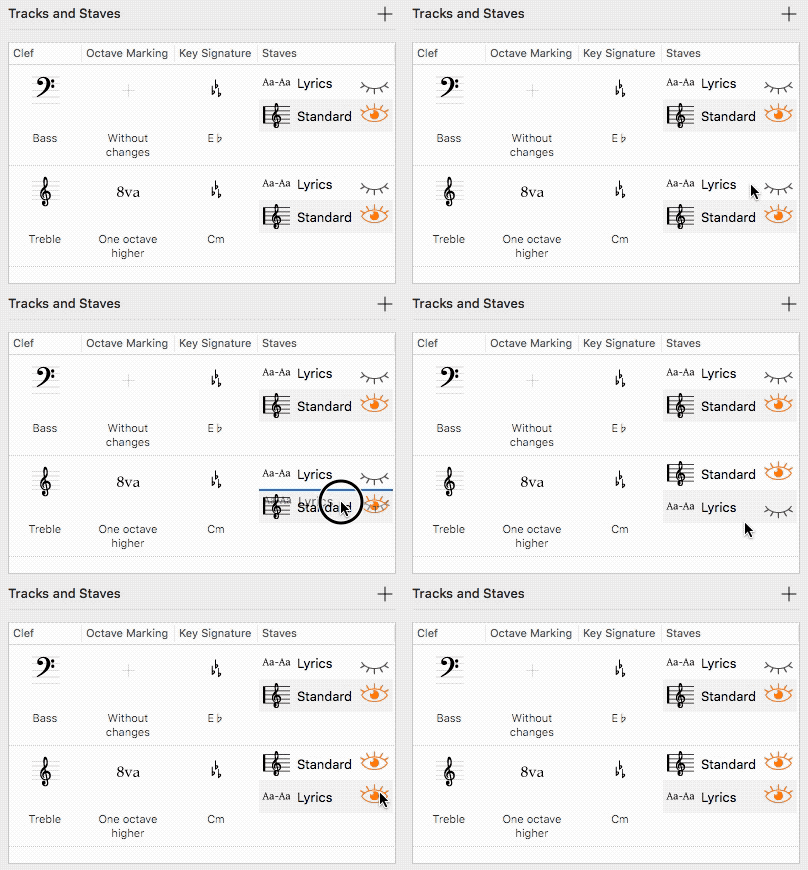
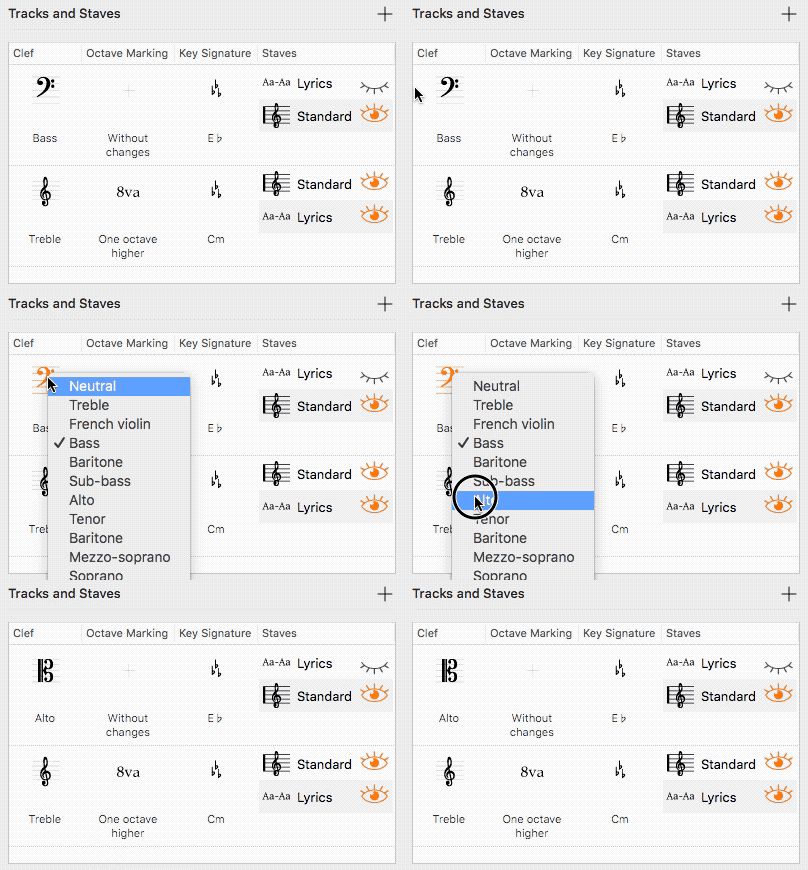
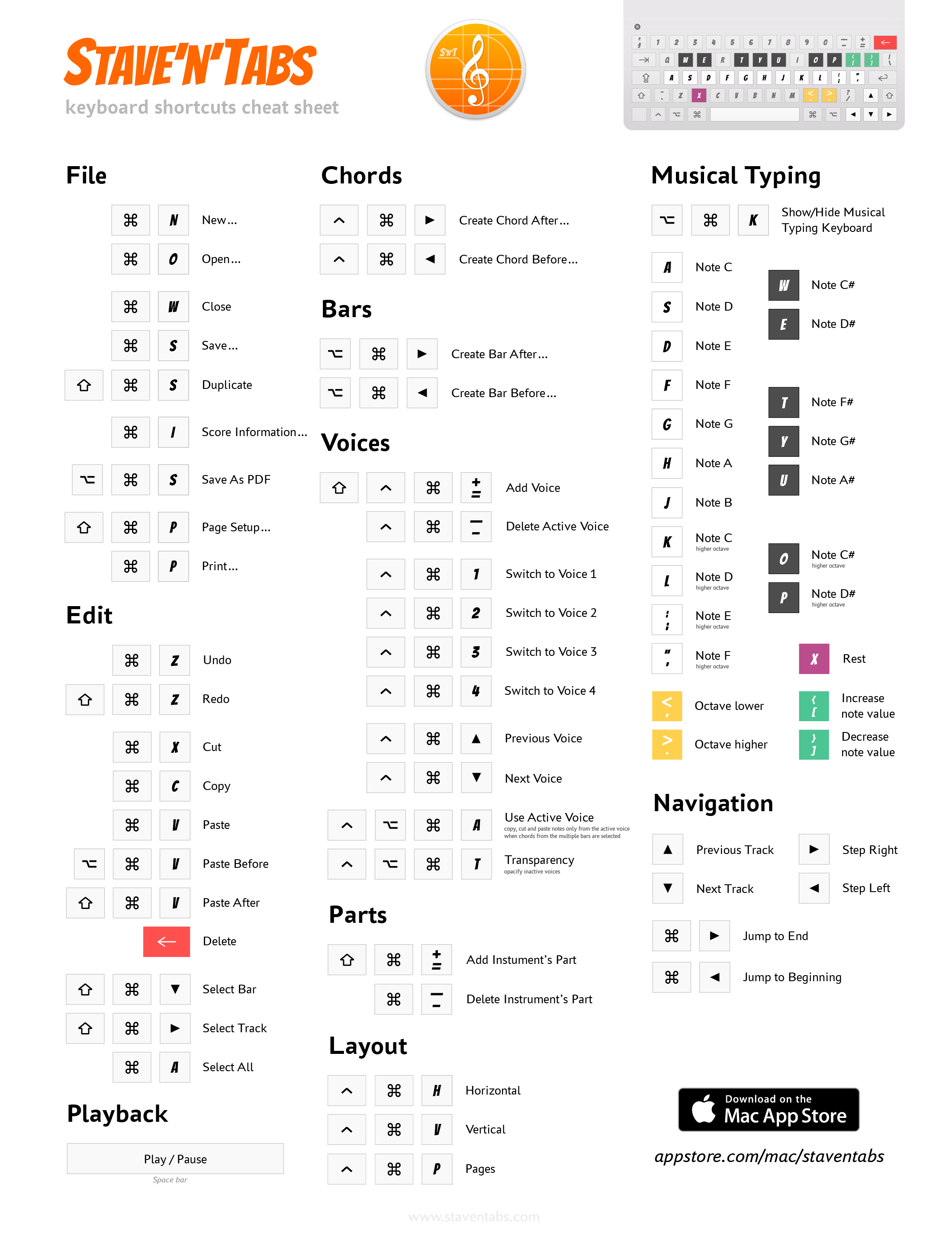
<?xml version="1.0" encoding="utf-8"?><feed xmlns="http://www.w3.org/2005/Atom"><generator uri="https://jekyllrb.com/" version="4.4.1">Jekyll</generator><link href="https://staventabs.com/feed/tips.xml" rel="self" type="application/atom+xml"/><link href="https://staventabs.com/" rel="alternate" type="text/html"/><updated>2026-03-12T06:23:30+00:00</updated><id>https://staventabs.com/feed/tips.xml</id><title type="html">Staventabs | Tips</title><subtitle>Simple and intelligent notation and tablature editor for iOS and macOS.</subtitle><entry><title type="html">Chords app actions for Shortcuts</title><link href="https://staventabs.com/tips/2025/02/15/chords-shortcuts.html" rel="alternate" type="text/html" title="Chords app actions for Shortcuts"/><published>2025-02-15T13:20:00+00:00</published><updated>2025-02-15T13:20:00+00:00</updated><id>https://staventabs.com/tips/2025/02/15/chords-shortcuts</id><content type="html" xml:base="https://staventabs.com/tips/2025/02/15/chords-shortcuts.html"><![CDATA[<p>Chords actions available in the Shortcuts app on <em>iOS</em>, <em>iPadOS</em> and <em>macOS</em></p> <p><picture><source type="image/webp" data-srcset="https://staventabs.com/assets/images/posts/tips/2025-02-chords-shortcuts/actions-in-the-shortcuts-app.webp 1x"/><img alt="Chords actions in the Shortcuts app" data-src="https://staventabs.com/assets/images/posts/tips/2025-02-chords-shortcuts/actions-in-the-shortcuts-app.png" data-srcset="https://staventabs.com/assets/images/posts/tips/2025-02-chords-shortcuts/actions-in-the-shortcuts-app.png 1x" class="lazyload e-lazyload-blur" src="data:image/png;base64,iVBORw0KGgoAAAANSUhEUgAAABQAAAANCAMAAACejr5sAAAAHlBMVEUUFRccHiAqKysODg4jJSdBQUIxMzYDAwMYGRpHPSqQA/49AAAAZ0lEQVR42m2PSQ6AMAwDnT38/8PEBcQi5taRmziAqAhsgAGukeooyj6w0gilhLtLC7HaIiaKavUresrkdx19y6RsnycWzySHnjMz9Vgk8jtzkh/ZTgfyXETkLe0l6RRVLL/K8ubVYwdO7wRHPTBC2QAAAABJRU5ErkJggg==" width="2360"/></picture></p> <p>Hi everyone! We have <a href="https://staventabs.com/releases/2025/02/04/chords-release-2.10.html">recently updated</a> our app and now it provides some actions for working with chords in the <em>Shortcuts app</em>.</p> <p>Here is the list of those actions with their short descriptions.</p> <p>Actions consuming a <em>chord symbol</em>, for example, Am, Gaug7, B6/9, EM7(b5)</p> <ul> <li><strong>How to Play Chord</strong>: provides textual step-by-step instructions for playing a specific chord.</li> <li><strong>Get Type of Chord</strong>: detects the type of a chord, such as Major Triad, Diminished 7th, Augmented Major 11th, etc.</li> <li><strong>Show Chord Diagram</strong>: generates the diagram. Highly customizable action where you can specify width, height, instrument, colors and chord symbol visibility.</li> </ul> <blockquote> <p>Currently, supported instruments are classical and acoustic guitars, and ukuleles.</p> </blockquote> <p>Actions consuming an <em>instrument name</em></p> <ul> <li><strong>Get Instrument by Name</strong>: recognizes instruments by their alternative names for using them in the previous actions, e.g. simply “Guitar” for <em>Classical Guitar</em>, “Ukulele” for <em>Soprano Ukulele</em>, “Alto Ukulele” for <em>Concert Ukulele</em>.</li> </ul> <p>Actions for working with <em>colors</em></p> <ul> <li><strong>Convert Color Component</strong>: rescales components between 8-bit values (0-255), normalized decimals (0-1), percentages (0-100%) and degrees (0-360°).</li> <li><strong>Make RGB Color</strong>: creates RGB color string in one of CSS-compatible formats, such as “rgb(R G B / A%)”, “color(colorspace R G B / A)”, and hex color “#RRGGBBAA”.</li> <li><strong>Make HSB Color</strong>: creates color with Hue/Saturation/Brightness components.</li> <li><strong>Make Grayscale Color</strong>: creates grayscale color with Brightness component.</li> <li><strong>Show Color</strong>: displays the view with info about provided color.</li> </ul> <p>As an example, we prepared a shortcut for creating a <strong>Chord Chart</strong> with chosen root notes and types. You can download it here: <a href="https://www.icloud.com/shortcuts/70bb90fa384e482bbfcca2177b3bbe16">https://www.icloud.com/shortcuts/70bb90fa384e482bbfcca2177b3bbe16</a>. Using this shortcut you can create a chord chart for ukulele as shown below.</p> <p><picture><source type="image/webp" data-srcset="https://staventabs.com/assets/images/posts/tips/2025-02-chords-shortcuts/chord-chart-ukulele.webp 1x"/><img alt="Ukulele Chord Chart created in the Shortcuts app" data-src="https://staventabs.com/assets/images/posts/tips/2025-02-chords-shortcuts/chord-chart-ukulele.png" data-srcset="https://staventabs.com/assets/images/posts/tips/2025-02-chords-shortcuts/chord-chart-ukulele.png 1x" class="lazyload e-lazyload-blur" src="data:image/png;base64,iVBORw0KGgoAAAANSUhEUgAAAA4AAAAUAQMAAACHy55vAAAABlBMVEX16NH369N0r6+bAAAAQElEQVQIW2O4d4JhDgcDgwRD4h2GBB4GBw6GBwwMvhYMuXdADJ0DDAkcDDESDH9OMDBoMOSeYPh/AKT4B5DLAADlQxBixNV/AgAAAABJRU5ErkJggg==" width="3000"/></picture></p> <p>Hope, this small overview will help you start creating your own awesome shortcuts!</p> <p> <a href="https://apps.apple.com/us/app/chords-by-staventabs/id1468347029?mt=8" data-ga-click="App Store - Chords, Appstore Button" target="_blank" style="display:inline-block;overflow:hidden;background:url(https://staventabs.com/assets/images/marketing/download-on-the-app-store.svg) no-repeat;background-size: contain;width:161.5464945px;height:54px;"></a> <a href="https://apps.apple.com/us/app/chords-by-staventabs/id1468347029?mt=8?platform=mac" data-ga-click="Mac App Store - Chords, Appstore Button" target="_blank" style="display:inline-block;overflow:hidden;background:url(https://staventabs.com/assets/images/marketing/download-on-the-mac-app-store.svg) no-repeat;background-size: contain;width:210.735729px;height:54px;"></a> </p>]]></content><author><name></name></author><category term="tips"/><summary type="html"><![CDATA[Actions for the Shortcuts app provided by the Chords app for macOS and iOS]]></summary><media:thumbnail xmlns:media="http://search.yahoo.com/mrss/" url="https://staventabs.com/assets/images/posts/tips/2025-02-chords-shortcuts/actions-in-the-shortcuts-app.png"/><media:content medium="image" url="https://staventabs.com/assets/images/posts/tips/2025-02-chords-shortcuts/actions-in-the-shortcuts-app.png" xmlns:media="http://search.yahoo.com/mrss/"/></entry><entry><title type="html">Instruments editing tips</title><link href="https://staventabs.com/tips/2017/04/18/instruments-editing-tips.html" rel="alternate" type="text/html" title="Instruments editing tips"/><published>2017-04-18T08:30:00+00:00</published><updated>2017-04-18T08:30:00+00:00</updated><id>https://staventabs.com/tips/2017/04/18/instruments-editing-tips</id><content type="html" xml:base="https://staventabs.com/tips/2017/04/18/instruments-editing-tips.html"><![CDATA[<p>Tips for editing instruments in Stave'n'Tabs for macOS version 3.1.</p> <p>With <a href="https://staventabs.com/releases/2017/04/18/snt-macos-release-3.1.html">version 3.1</a> you can reorder instrument parts, tracks and staves dragging their cells in the corresponding tables.</p> <ul> <li>Reordering instrument parts in the Tracks Board</li> </ul> <p><img src="https://staventabs.com/assets/images/posts/tips/2017-04-18-instruments-editing-tips/reordering-instruments.gif" alt="Reordering instruments"/></p> <ul> <li>Reordering tracks in the Instrument Customizing Tool</li> </ul> <p><img src="https://staventabs.com/assets/images/posts/tips/2017-04-18-instruments-editing-tips/reordering-tracks.gif" alt="Reordering tracks"/></p> <ul> <li>Reordering staves and setting lyrics visible</li> </ul> <p><img src="https://staventabs.com/assets/images/posts/tips/2017-04-18-instruments-editing-tips/reordering-staves-and-setting-lyrics-visible.gif" alt="Reordering staves"/></p> <ul> <li>Changing clef for the whole track</li> </ul> <p><img src="https://staventabs.com/assets/images/posts/tips/2017-04-18-instruments-editing-tips/changing-clef.gif" alt="Changing clef"/></p>]]></content><author><name></name></author><category term="tips"/><category term="video"/><category term="protip"/><summary type="html"><![CDATA[Animated tips for reordering instrument parts in the Tracks Board, reordering tracks in the Instrument Customizing Tool, reordering staves and setting lyrics visible, and changing clef for the whole track in the macOS version of S'n'T]]></summary></entry><entry><title type="html">Keyboard Shortcuts Cheat Sheet</title><link href="https://staventabs.com/tips/2016/12/04/snt-macos-keyboard-shortcuts.html" rel="alternate" type="text/html" title="Keyboard Shortcuts Cheat Sheet"/><published>2016-12-04T08:00:00+00:00</published><updated>2016-12-04T08:00:00+00:00</updated><id>https://staventabs.com/tips/2016/12/04/snt-macos-keyboard-shortcuts</id><content type="html" xml:base="https://staventabs.com/tips/2016/12/04/snt-macos-keyboard-shortcuts.html"><![CDATA[<p>Cheat sheet with keyboard shortcuts for Stave'n'Tabs macOS</p> <p><img src="https://staventabs.com/assets/images/posts/tips/2016-12-04-snt-macos-keyboard-shortcuts/keyboard-shortcuts_cheatsheet.png" alt="Stave'n'Tabs macOS Keyboard Shortcuts"/></p> <p><a href="https://itunes.apple.com/us/app/staventabs/id1107712488?mt=12" data-ga-click="Mac App Store, Appstore Button" target="_blank" style="display:inline-block;overflow:hidden;background:url(https://staventabs.com/assets/images/marketing/download-on-the-mac-app-store.svg) no-repeat;background-size: contain;width:210.735729px;height:54px;"></a></p>]]></content><author><name></name></author><category term="tips"/><summary type="html"><![CDATA[Chart with helpful keyboard shortcuts for macOS version of S'n'T]]></summary><media:thumbnail xmlns:media="http://search.yahoo.com/mrss/" url="https://staventabs.com/assets/images/posts/tips/2016-12-04-snt-macos-keyboard-shortcuts/keyboard-shortcuts_cheatsheet.png"/><media:content medium="image" url="https://staventabs.com/assets/images/posts/tips/2016-12-04-snt-macos-keyboard-shortcuts/keyboard-shortcuts_cheatsheet.png" xmlns:media="http://search.yahoo.com/mrss/"/></entry></feed>